See the bigger picture
Start screen capture on your phone, then view, rotate, pause, or take a screenshot from your browser.
PhoneMirror
Mirror your Android screen and manage files from your computer over the same Wi-Fi. No extra desktop software. Just your phone and a browser.
Designed & developed by Poovarasan Vasudevan
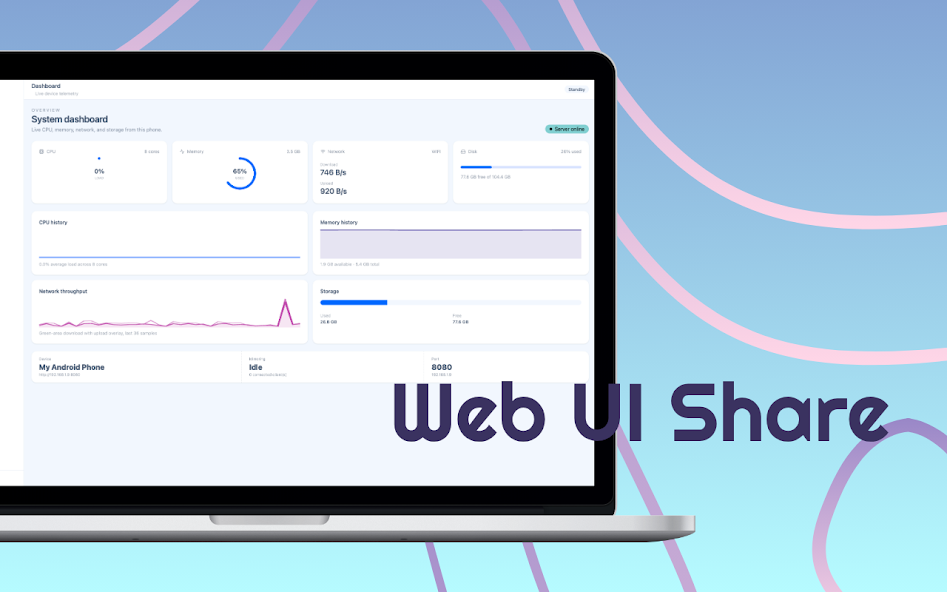 PhoneMirror / THE APP IN ACTION
Explore what you can do with PhoneMirror.
Start screen capture on your phone, then view, rotate, pause, or take a screenshot from your browser.
Browse folders, upload and download files, and preview documents and media from your computer.
Screen and file sharing stay on your local network, with optional password protection and live device metrics.
Screenshots from Google Play.
Scroll to explore. Select one to enlarge.
Screen capture needs Android permission. Full file browsing requires storage access. Some Wi-Fi networks isolate devices and may block connections.
Connect your Android phone and computer to the same Wi-Fi.
Start the server in PhoneMirror and allow screen capture when prompted.
Open the address shown in the app in your computer browser.
Local networking · Android screen capture · Browser dashboard
Questions or feedback? Get in touch ↗Discover PhoneMirror on Google Play.
Get PhoneMirror ← Back to all apps EXPLORE NEXTQR Scanner